When everything in a product is important
To make sure design tasks with hidden value don't get lost
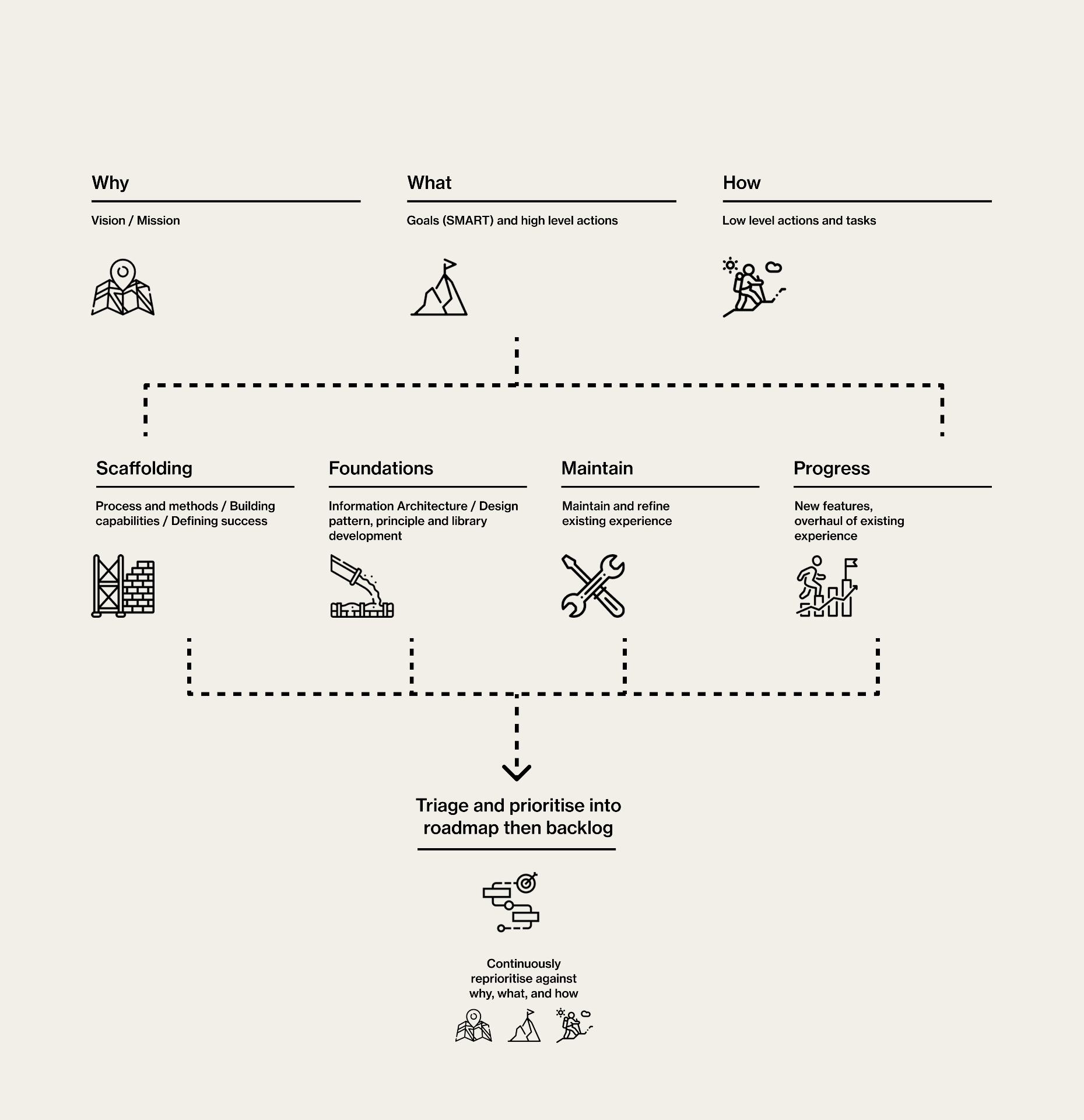
Sifting through the archives today I found this diagram I made to inform a discussion about how we can organise and prioritise design tasks when putting together a roadmap. It's also useful for general product roadmap development, so I'm going to put it here so I can access it again when it's needed. The short story is we often create design debt because we are prioritising critical fixes and new products, putting off low impact work for later. If you're reading this you know this sets a trap that will eventually spring on you, usually in the form of growing design inconsistency, delivery slowdown, and technical and UX debt.
Categorising work into buckets that describe their purpose and impact is a simple low effort way to frame up prioritisation conversations in a way that supports a balanced roadmap. Basically we put everything in one of these buckets:
Scaffolding
The Scaffolding bucket is for work that doesn't directly impact the customer but improves how teams design, build, measure, and collaborate. This is the operational and strategic layer that supports everything else.
Stuff like:
- Design process improvements
- Accessibility governance
- Success metrics
- Ways of working
- Documentation standards
Foundations
The Foundations bucket is for work that establishes or strengthens the core structure of the experience. This is the architectural layer of UX and product design. It creates reusable systems and durable patterns that future work depends on.
Examples include:
- Information architecture redesign
- Navigation models
- Design systems and component libraries
- Taxonomy and terminology work
Maintain
Use the Maintain bucket for work focused on preserving, refining, and stabilising the current experience. This is the continuous care and quality layer. It keeps products usable, reliable, and aligned with evolving user expectations.
Stuff like:
- UX polish
- Bug fixing
- Accessibility remediation
- Small usability improvements
- Content updates
- Reducing friction in existing flows
Maintain work is rarely flashy, but neglecting it creates experience debt that accumulates quickly.
Progress
Use the Progress bucket for work that meaningfully advances the product or experience.
These are the new features that attract new customers:
- New capabilities
- Major journey redesigns
- Entering new markets or audiences
- AI integrations
Progress work is often the most visible and commercially exciting, but it depends heavily on the health of the other three buckets.